Article
Web Push Demystified: How the Web Learned to Tap You on the Shoulder
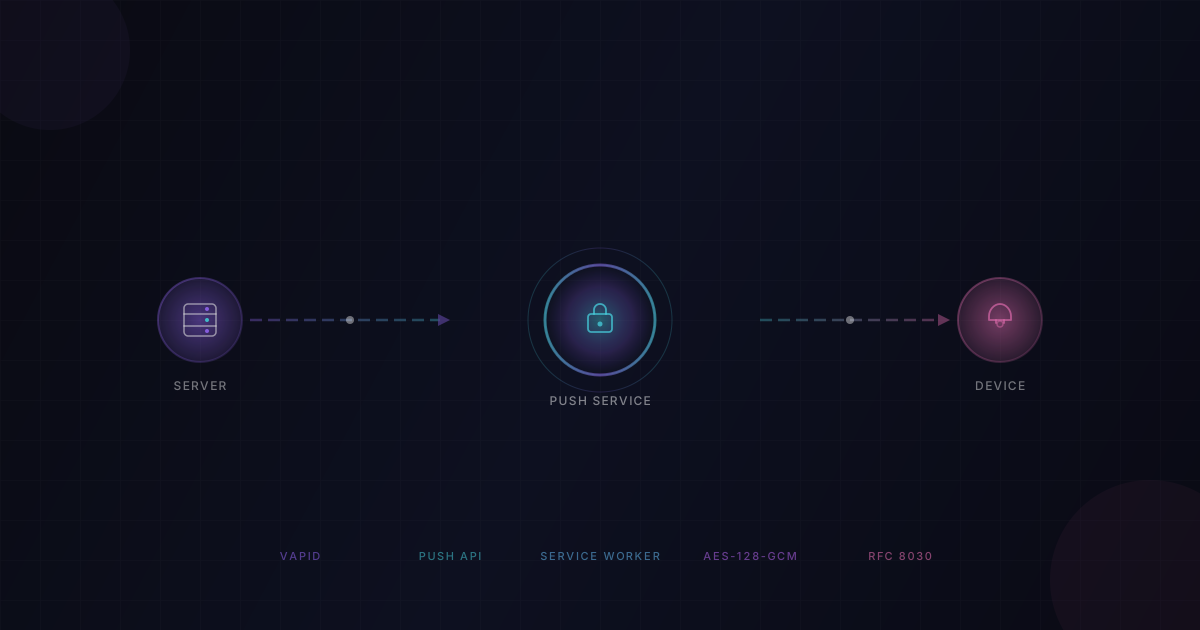
You've installed a web app on your phone. You close it. You lock your screen. Ten minutes later - buzz - a notification pops up: "New message from Alex." You tap it, and the app opens right where you need it.
How did that work? The web app wasn't running. There's no native code. No APNs. No Firebase Cloud Messaging (well, not directly). Just... a website. Yet somehow it reached through your locked screen and tapped you on the shoulder.
This is Web Push - a set of open web standards that give web applications the same background notification superpower that native mobile apps have had for over a decade. It's the technology that makes Progressive Web Apps (PWAs) feel genuinely native.
This post explains what Web Push is, who the players are, and exactly how a message travels from your server to a user's locked phone - with diagrams, analogies, and no hand-waving.
📬 The Problem: Web Apps Can't Ring the Doorbell
Here's the fundamental issue. A web app's JavaScript runs only when the page is open. Close the tab, and everything stops. There's no background thread, no persistent socket, no daemon watching for updates.
Compare this with native apps on your phone. When WhatsApp or Gmail sends you a notification, the OS-level push infrastructure (APNs on iOS, FCM on Android) wakes the app in the background, delivers a payload, and triggers a notification - all without the app being actively running.
For years, web apps were stuck in the pull world: the app had to be open to ask, "Anything new?" If the user closed the tab, the app went silent. There were hacks - long polling, WebSockets - but they all depended on the page being alive.
Web Push changes this. It gives web apps a way to push information to the user even when the browser tab is closed, the browser is minimized, or on mobile, the PWA is completely suspended.

The critical insight: your server never talks directly to the user's browser. There's always a middleman. And that middleman is the key to everything.
🏗️ The Three Players: Server, Push Service, Service Worker
Web Push isn't a single API call. It's a coordinated system with three distinct roles, each with a specific job:
1. Your Application Server (The Sender)
This is your backend - the thing that decides "User X needs to know about this." It could be a Node.js server, a Go service, a Python backend, whatever. When an event happens (a new message, a task assignment, a price drop), your server is the one that initiates the push.
2. The Push Service (The Middleman)
This is the surprising one. Your server never connects directly to the user's browser. Instead, it sends the message to a push service - a web service operated by the browser vendor.
- Chrome uses Google's push service (at
fcm.googleapis.com) - Firefox uses Mozilla's push service (at
push.services.mozilla.com) - Safari uses Apple's push service
You don't get to choose which push service is used. The browser decides. But here's the genius: it doesn't matter, because every push service speaks the same language - the Web Push Protocol (an IETF standard, RFC 8030). Your server makes one standardized HTTP POST request, regardless of which browser the user has.
3. The Service Worker (The Receiver)
A service worker is a special JavaScript file that runs in the background, separate from any web page. It has no access to the DOM, but it has something more important: it can be woken up by the browser even when no tab is open.
When the push service delivers a message to the browser, the browser wakes up the service worker and fires a push event. The service worker then calls showNotification() to display the notification on the user's screen.

Think of it like a postal system: you (the server) write a letter and hand it to the postal service (the push service). The postal service has a permanent delivery route to the user's house (the persistent OS connection). The postal service drops the letter at the door, and the house's automated doorbell system (the service worker) rings the bell and shows the notification.
🔑 VAPID Keys: The Server's Passport
Here's a security question: if anyone can make an HTTP POST to the push service, what stops a random attacker from spamming your users with fake notifications?
The answer is VAPID - Voluntary Application Server Identification for Web Push (RFC 8292).
VAPID is like a passport for your server. It's a pair of cryptographic keys - one public, one private - that uniquely identify your application.
| Key | What It Is | Who Sees It |
|---|---|---|
| Public Key | Your server's identity, like a passport number | Everyone - the browser, the push service |
| Private Key | Your server's secret proof of identity | Only your server - never exposed to clients |
| Subject | A mailto: or https:// contact for the app operator | The push service (for operational contact) |
How It Works
- You generate a VAPID key pair once for your application (using tools like
npx web-push generate-vapid-keys). - When the user subscribes to push, you pass the public key to the browser. The browser forwards it to the push service, which stores it alongside the subscription.
- When you send a push message, you sign a JSON Web Token (JWT) with your private key and include it in the request headers.
- The push service uses the stored public key to verify the JWT signature. If it matches, the message is authentic. If not, it's rejected.
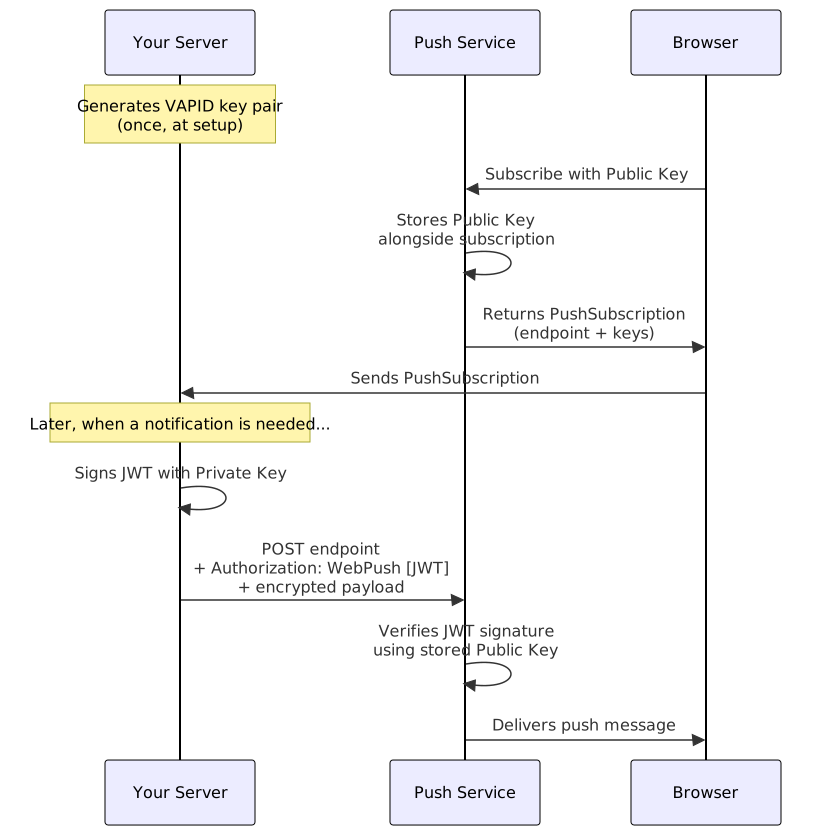
The beauty of this system is that even the push service - which is controlled by Google, Mozilla, or Apple - cannot read your message payload. It can only verify that the message came from the right server. The payload is end-to-end encrypted between your server and the user's browser.
📋 The Subscription: Getting the User's Address
Before you can send a push notification, you need the user's permission and their push subscription - a unique address that tells you how to reach that specific browser on that specific device.
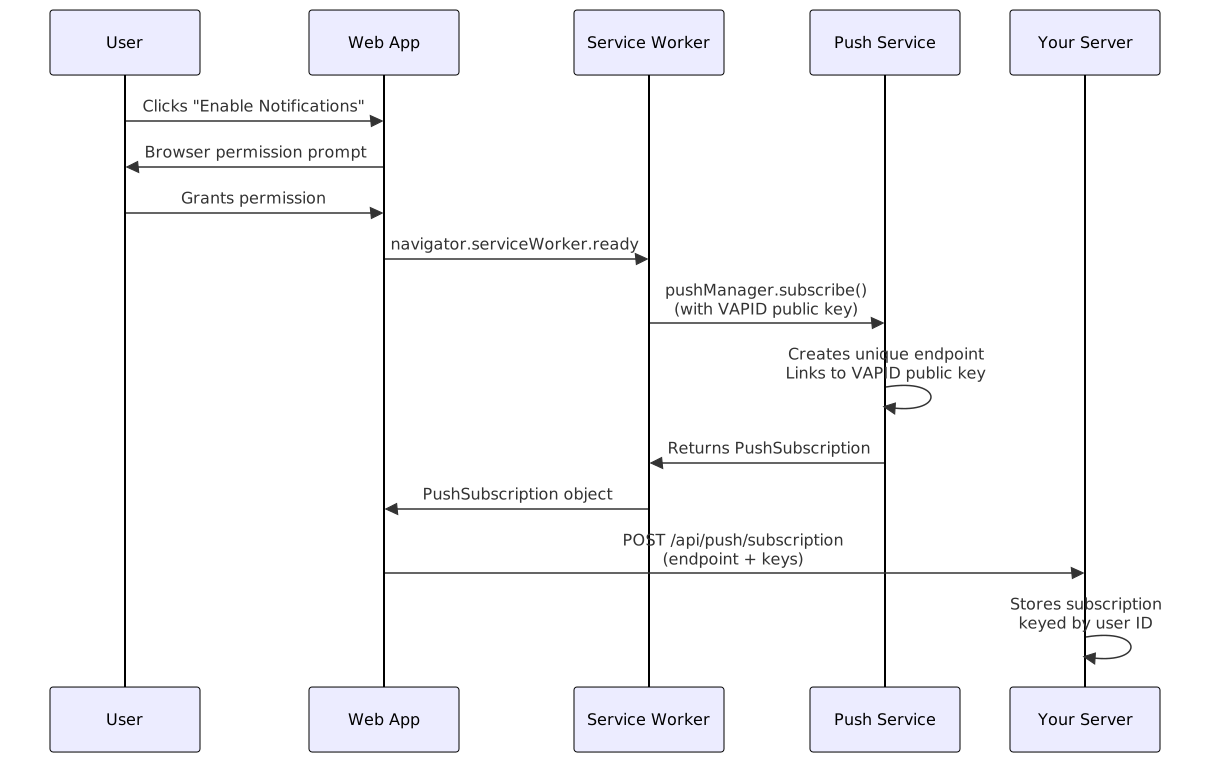
Step 1: Ask Permission
The browser requires explicit user consent before allowing push notifications. This must be triggered by a user gesture (like clicking an "Enable Notifications" button), not silently on page load.
// Must be called from a user gesture (button click, etc.)
const permission = await Notification.requestPermission();
if (permission === 'granted') {
// We can now subscribe to push
} else if (permission === 'denied') {
// User blocked notifications - can't ask again
// They must manually re-enable in browser settings
}This is intentional. Browsers learned the hard way that auto-prompting for notifications on page load is a terrible UX - it trained users to reflexively click "Block." Modern best practice: explain why you need notifications, then ask.
Step 2: Subscribe to Push
Once permission is granted, you subscribe the user through the Push API:
// Wait for the service worker to be ready
const registration = await navigator.serviceWorker.ready;
// Subscribe to push with your VAPID public key
const subscription = await registration.pushManager.subscribe({
userVisibleOnly: true, // Required: promise to show a notification
applicationServerKey: urlBase64ToUint8Array(VAPID_PUBLIC_KEY)
});The userVisibleOnly: true parameter is a contract with the browser: every push you receive must result in a visible notification. No silent background tracking allowed.
Step 3: Inspect the Subscription
The PushSubscription object you get back contains everything your server needs:
{
"endpoint": "https://fcm.googleapis.com/fcm/send/dR0fH_K7rpQ:APA91b...",
"expirationTime": null,
"keys": {
"p256dh": "BGyyVt9FFV...",
"auth": "R9sidzkcdf..."
}
}Let's break this down:
| Field | Purpose |
|---|---|
endpoint | The unique URL on the push service for this specific browser+device. Your server POSTs to this URL to send a push. |
keys.p256dh | The browser's public encryption key. Used to encrypt the payload so only this browser can decrypt it. |
keys.auth | A shared authentication secret. Also used in payload encryption. |
expirationTime | When the subscription expires (often null, meaning the push service decides). |
The endpoint is essentially a capability URL. Anyone who knows it can send pushes to that user. This is why you must treat it as sensitive data - protect it like a password.
Step 4: Send the Subscription to Your Server
The frontend sends this subscription object to your backend, which stores it for later use:
await fetch('/api/push/subscription', {
method: 'POST',
headers: { 'Content-Type': 'application/json' },
body: JSON.stringify(subscription)
});Your server stores this subscription (in a database, in Redis, wherever makes sense for your architecture) keyed by user ID, so you can look it up later when you need to notify that user.
🚀 Sending a Push Message
An event happens on your server - a new message arrives for User X. Here's what happens next.
Step 1: Encrypt and Send
Your server retrieves User X's stored subscription, then encrypts the payload using the browser's p256dh and auth keys. Since the push service is a middleman, Web Push uses end-to-end encryption (RFC 8291) so only the user's browser can read the message.
The process: your server generates ephemeral ECDH keys, computes a shared secret with the browser's public key, derives an encryption key via HKDF, and encrypts using AES-128-GCM. The push service only ever sees opaque bytes.

In practice, libraries like web-push (Node.js), pywebpush (Python), or webpush-go (Go) handle the crypto, JWT signing, and HTTP formatting:
const webpush = require('web-push');
webpush.setVapidDetails(
'mailto:ops@yourapp.com',
VAPID_PUBLIC_KEY,
VAPID_PRIVATE_KEY
);
await webpush.sendNotification(
userSubscription,
JSON.stringify({
title: 'New message from Alex',
body: 'Hey, are you free for lunch?',
tag: 'message-alex'
}),
{ TTL: 3600, urgency: 'high' }
);The library encrypts the payload, signs the VAPID JWT, sets headers (Authorization, Crypto-Key, Encryption, Content-Encoding, TTL, Urgency, Topic), and POSTs to the push service endpoint.
Step 2: Delivery
The push service validates your VAPID signature, then delivers the encrypted message over a persistent OS-level connection - the same always-on socket that native push systems (APNs, FCM) use.
This is the key insight: the push service maintains a permanent connection to every browser. Your server doesn't need to. You hand off the message, and the push service handles the last mile - even to a phone with its screen off. If the device is offline, the message stays queued until the device reconnects or the TTL expires.
The response tells your server what happened:
| Code | Meaning | Action |
|---|---|---|
201 | Accepted and queued | Success |
410 | Subscription permanently invalid | Delete from your database |
429 | Rate limited | Retry after Retry-After header |
The 410 response is your self-cleaning mechanism - when a user uninstalls or clears browser data, the push service tells you automatically.
⚙️ The Service Worker: The Always-On Listener
The service worker is the final piece. It's a JavaScript file that the browser can wake up independently of any open page. Here is a minimal but complete push-capable service worker:
// sw.js - your service worker
self.addEventListener('push', function(event) {
// Parse the encrypted payload (automatically decrypted by the browser)
const data = event.data ? event.data.json() : {};
const title = data.title || 'New notification';
const options = {
body: data.body || 'You have a new update.',
icon: '/icons/app-icon-192.png',
badge: '/icons/badge-72.png',
tag: data.tag || 'default', // Replaces older notifications with same tag
renotify: true, // Vibrate even if replacing
data: { url: data.url || '/' } // Store data for the click handler
};
// event.waitUntil() keeps the service worker alive until the notification is shown
event.waitUntil(
self.registration.showNotification(title, options)
);
});
self.addEventListener('notificationclick', function(event) {
event.notification.close();
// Open or focus the app
event.waitUntil(
clients.matchAll({ type: 'window', includeUncontrolled: true })
.then(function(clientList) {
// If the app is already open, focus it
for (const client of clientList) {
if (client.url.includes(self.location.origin) && 'focus' in client) {
return client.focus();
}
}
// Otherwise, open a new window
return clients.openWindow(event.notification.data.url || '/');
})
);
});Notice how the push event handler must show a notification. Remember the userVisibleOnly: true contract? This is where it's enforced. If you receive a push and don't show a notification, the browser may revoke your push permission or show a generic "This site has been updated in the background" notification instead.
The notificationclick handler is your chance to control what happens when the user taps the notification. Typically, you focus an existing app window or open a new one.
The whole journey - from server event to notification on screen - typically takes under a second when the device is online.
🔒 Security: Why This Design is Smart
Web Push's architecture makes several smart security decisions:
1. End-to-end encryption is mandatory. The push service cannot read your payloads. Even if the push service is compromised, the attacker gets encrypted bytes they can't decrypt. Only the user's browser has the private key needed for decryption.
2. VAPID prevents spoofing. Without your private key, no one can impersonate your server. The push service cryptographically verifies every message.
3. Subscription endpoints are capability URLs. The endpoint URL is effectively a secret - knowing it is sufficient to send a push to that user. This is why subscriptions should be stored securely and never logged or exposed in debug output.
4. User consent is required. The browser enforces explicit permission. No background silent tracking. Every push must result in a visible notification (userVisibleOnly: true).
5. Secure context required. The Push API only works over HTTPS. No exceptions.
🧩 Browser Support and Push Services
Web Push enjoys broad support across modern browsers:
| Browser | Push Service | Support Since |
|---|---|---|
| Chrome (desktop + Android) | fcm.googleapis.com | Chrome 42 (2015) |
| Firefox (desktop + Android) | push.services.mozilla.com | Firefox 44 (2016) |
| Edge | fcm.googleapis.com (Chromium) | Edge 17 (2018) |
| Safari (macOS + iOS) | Apple Push Service | Safari 16 / iOS 16.4 (2023) |
A few important caveats:
- iOS Safari requires the web app to be added to the Home Screen (installed as a PWA) for push to work. Push doesn't work in regular Safari tabs on iOS.
- WebView on Android does not support Push API - it works only in full browsers.
- Each browser+device combination creates a separate subscription. Subscribing on desktop Chrome does not subscribe your phone. Each needs its own subscription.
⚡ Practical Tips
Keep payloads small. The Web Push spec guarantees at least 4KB, but smaller is faster and more reliable. Send just enough data to render the notification (title, body, tag), then let the app fetch full details when opened.
Use tag for deduplication. If you send multiple notifications of the same type (e.g., new messages), give them the same tag. The browser replaces older notifications with the same tag instead of stacking them.
Set appropriate TTL. A chat message should expire quickly (minutes). A task assignment might live longer (hours). A time-sensitive sale alert is useless after the sale ends. Match TTL to your content's shelf life.
Handle 410 Gone gracefully. When the push service tells you a subscription is dead, remove it immediately. Don't keep sending to stale subscriptions - the push service may rate-limit you.
Re-upsert on app open. Every time the app opens and notifications are enabled, re-send the current subscription to your server. This handles the case where the browser silently rotated the subscription, and keeps your stored data fresh.
Don't ask for permission too early. The biggest mistake: prompting for notifications the moment the page loads. Instead, wait until the user has context for why they'd want notifications, and trigger the prompt from an explicit button click.
📖 Source References
- MDN: Push API
- MDN: PushManager.subscribe()
- MDN: ServiceWorkerRegistration.showNotification()
- MDN: Notification API
- web.dev: Push Notifications Overview
- web.dev: How Push Works
- web.dev: Subscribing a User
- web.dev: Web Push Protocol
- IETF: RFC 8030 - Generic Event Delivery Using HTTP Push (Web Push Protocol)
- IETF: RFC 8291 - Message Encryption for Web Push
- IETF: RFC 8292 - VAPID for Web Push